

Close Menu
AM ChronicleAM Chronicle
  • Content
    • News
    • Insights
    • Case Studies
    • AM Infocast
  • Focus Regions
    • India
    • Asia Pacific
    • Middle East
    • North America
    • Europe
  • Industries
    • Automotive
    • Aerospace
    • Defence
    • Energy
    • Construction
    • Healthcare
    • Tooling
    • Engineering
  • Training
  • Magazine
    • Digital Issues
  • Events
Facebook Instagram YouTube LinkedIn
  • About us
  • Media Kit
  • Contact us
Facebook Instagram YouTube LinkedIn
AM ChronicleAM Chronicle
  • Content
    1. News
    2. Insights
    3. Case Studies
    4. AM Infocast
    5. View All
    Bahrain’s First Advanced Additive Manufacturing Hub Launched

    Bahrain Launches First Advanced Additive Manufacturing Hub in Partnership with Roboze

    December 12, 2025
    Airbus Now 3D Printing Over 25,000 Flight-Ready Plastic Parts Annually

    Airbus Now 3D Printing Over 25,000 Flight-Ready Plastic Parts Annually

    December 12, 2025
    Caracol and RusselSmith Sign a Strategic Partnership to Drive Advanced Manufacturing in West Africa

    Caracol and RusselSmith Sign a Strategic Partnership to Drive Advanced Manufacturing in West Africa

    October 3, 2025
    NAMI and Lockheed Martin Collaborate for Additive Manufacturing Conversion Project

    NAMI and Lockheed Martin Collaborate for Additive Manufacturing Conversion Project 

    September 16, 2025
    Making Milestones: 3D printing for a greener tomorrow

    Making Milestones: 3D printing for a greener tomorrow

    August 29, 2025
    Nestlé embraces technology and innovation in 3D printing

    Nestlé embraces technology and innovation in 3D printing

    August 29, 2025
    Pure copper and copper alloy (CuCrZr, CuCrNb, CuSn10) samples produced using ADDIREEN's green-laser powder bed fusion AM machines (Image courtesy: Addireen Technologies)

    Addireen: Pioneering Copper Printing in Metal Additive Manufacturing

    August 12, 2025
    Digital Twin Integration in Additive Manufacturing Systems: Revolutionizing Design, Production, and Lifecycle Management

    Digital Twin Integration in Additive Manufacturing Systems: Revolutionizing Design, Production, and Lifecycle Management

    July 4, 2025
    Source: Formlabs

    Case Study: Eaton Corporation’s Strategic Transition to In-House 3D Printing for Tooling Applications

    August 29, 2025
    Revolutionizing Atherosclerosis Research with 3D-Bioprinted Brain Vessels

    Revolutionizing Atherosclerosis Research with 3D-Bioprinted Brain Vessels

    August 25, 2025
    Formlabs fuse 1+

    How Imaginarium Helped Kaash Studio Scale with the Right 3D Printing Technology

    April 12, 2025
    The Formlabs Fuse 1+ 30W

    Kaash Studio Optimized Service Bureau Operations with Formlabs 3D Printers- Case Study

    January 30, 2025
    Sustainable Production of Metal Powder for Additive Manufacturing

    Sustainable Production of Metal Powder for Additive Manufacturing with Bruce Bradshaw

    February 15, 2024
    Meeting Evolving Customer Demands in the Additive Manufacturing Industry with Tyler Reid

    Meeting Evolving Customer Demands in the Additive Manufacturing Industry with Tyler Reid

    February 9, 2024
    Innovation is at the heart of AMUG with Diana Kalisz

    Innovation is at the heart of AMUG with Diana Kalisz

    March 7, 2023
    3D Printing Workshops at AMUG with Edward Graham

    3D Printing Workshops at AMUG with Edward Graham

    March 7, 2023
    Bahrain’s First Advanced Additive Manufacturing Hub Launched

    Bahrain Launches First Advanced Additive Manufacturing Hub in Partnership with Roboze

    December 12, 2025
    Airbus Now 3D Printing Over 25,000 Flight-Ready Plastic Parts Annually

    Airbus Now 3D Printing Over 25,000 Flight-Ready Plastic Parts Annually

    December 12, 2025
    Ms. Larissa Smith, Director, Advanced Manufacturing, DRPM, Maritime Industrial Base Program, U.S. Navy, and Mr. Ken Jeanos, VP, Materials and Supply Chain, General Dynamics Electric Boat, are joined by Lincoln Electric leadership and its Additive Solutions team to commemorate the ribbon cutting that marks the investment of four SculptPrint™ 1500 additive manufacturing cells to support the production of critical submarine components.

    U.S. Navy’s Maritime Industrial Base Program, General Dynamics Electric Boat, and Lincoln Electric Advance Additive Manufacturing to Strengthen Submarine Production

    October 3, 2025
    Caracol and RusselSmith Sign a Strategic Partnership to Drive Advanced Manufacturing in West Africa

    Caracol and RusselSmith Sign a Strategic Partnership to Drive Advanced Manufacturing in West Africa

    October 3, 2025
  • Focus Regions
    • India
    • Asia Pacific
    • Middle East
    • North America
    • Europe
  • Industries
    • Automotive
    • Aerospace
    • Defence
    • Energy
    • Construction
    • Healthcare
    • Tooling
    • Engineering
  • Training
  • Magazine
    • Digital Issues
  • Events
Subscribe
AM ChronicleAM Chronicle
Home » News

Formlabs Introduces Texture Engine for 3D Printing Texture

News By AM Chronicle Editorial TeamMarch 2, 20246 Mins Read
Formlabs Texture Engine
LinkedIn Twitter Facebook WhatsApp Pinterest Email Copy Link

Formlabs Introduced the Texture Engine, which is currently available in beta. This free, lightweight, web-based app is designed to quickly apply textures to 3D models, ready to be 3D printed. Many plastic parts incorporate surface textures and patterns to enhance the look and feel or to optimize the part for an intended application. Typically, this is done as a secondary process, but 3D printing makes it possible to apply textures and patterns directly to files for printing.

Traditionally, texturing is added directly to the surface of a machined mold via a photochemical etching or laser etching process. 3D printing technologies can produce parts with enough detail to directly print textured parts, but even with the most advanced CAD tools, applying texture can be a difficult process.

To apply a texture to a part, most engineers or product designers export their CAD body as a mesh and bring it into a mesh editing tool designed for artists and designers. With the Formlabs Texture Engine, it’s possible to quickly apply surface textures and patterns to 3D models for fast iterations and the production of textured or patterned 3D printed parts.

How to Use the Formlabs Texture Engine To Texture 3D Models

1. Export a Mesh To Be Textured

1.1 Start by creating the base geometry in CAD software. Select the faces to texture and create a new surface body from these faces. In Fusion 360, this can be done with the offset tool within the surface toolbox by setting the offset distance to zero.
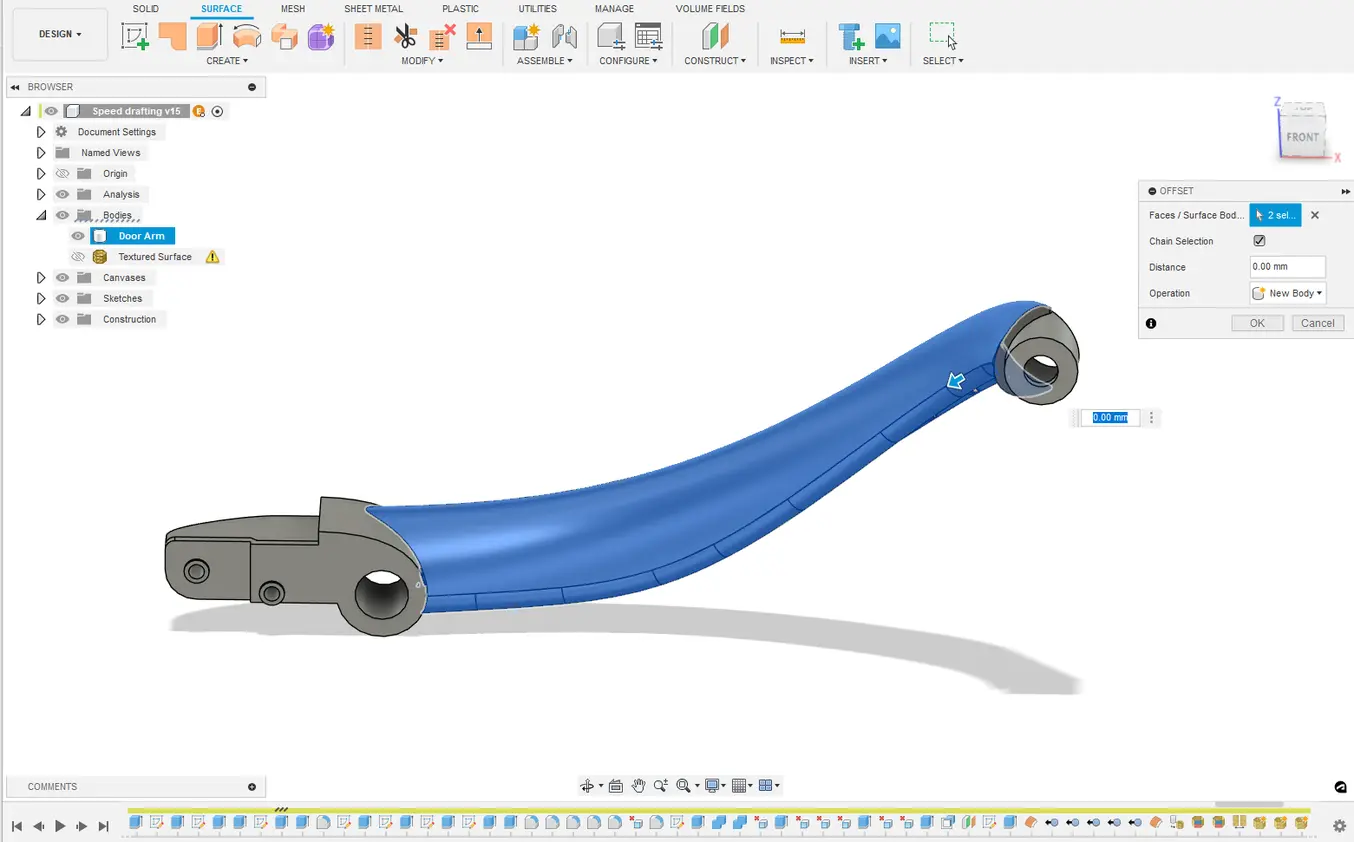
Formlabs Texture Engine
Creating a surface body using (BREP) geometry

1.2 If working with a mesh instead of a CAD body, this same step can be done by generating surface groups and then splitting the desired surface groups from the main body. This can be done directly in Fusion 360 or can be done in a dedicated mesh editing tool.
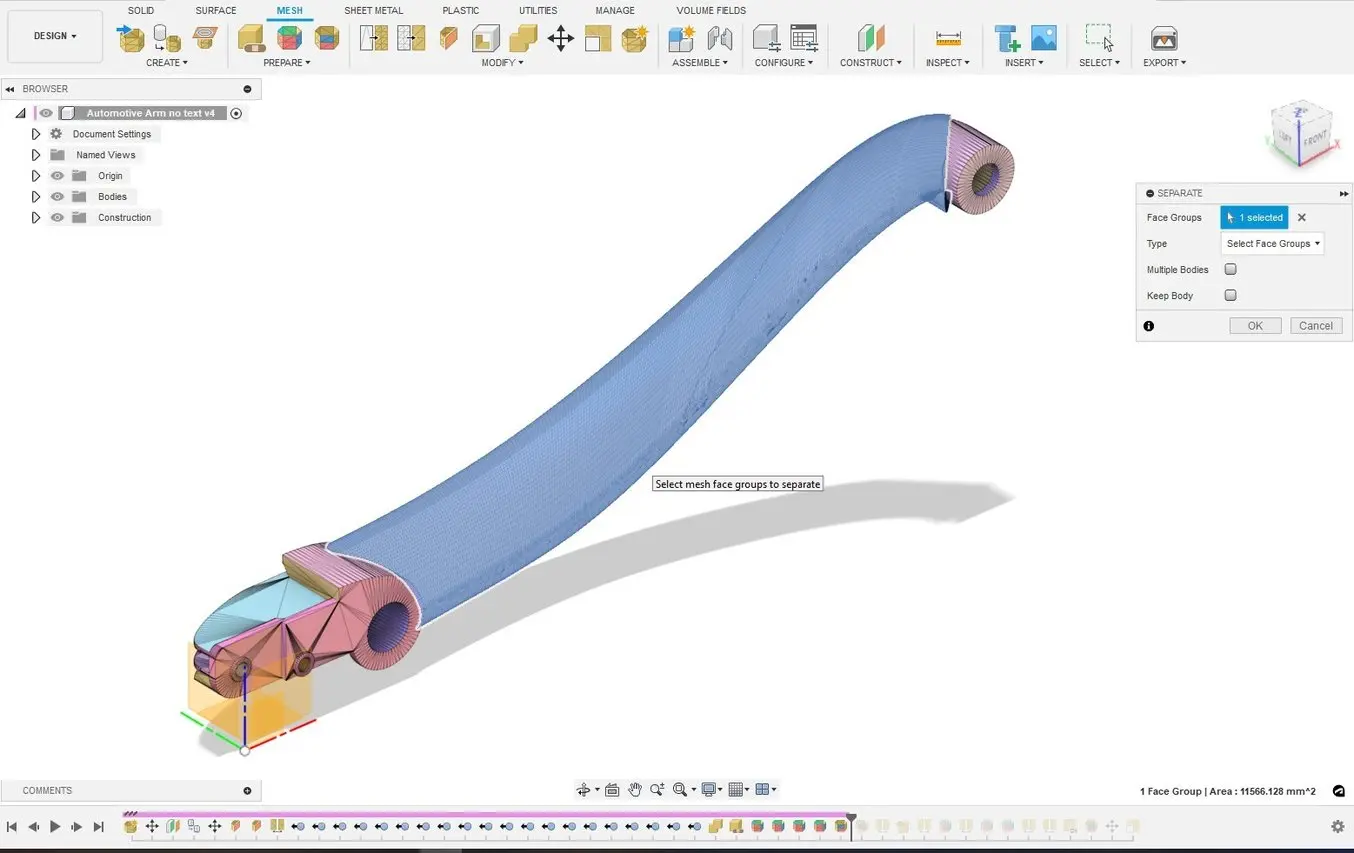
Formlabs Texture Engine
Using mesh face groups to isolate and separate the same geometry.

1.3 When creating the final mesh to be exported, ensure that the mesh density is high and that the spacing between nodes is relatively consistent. Be sure to turn off any “adaptive” meshing options as these will cause inconsistent spacing of the mesh.
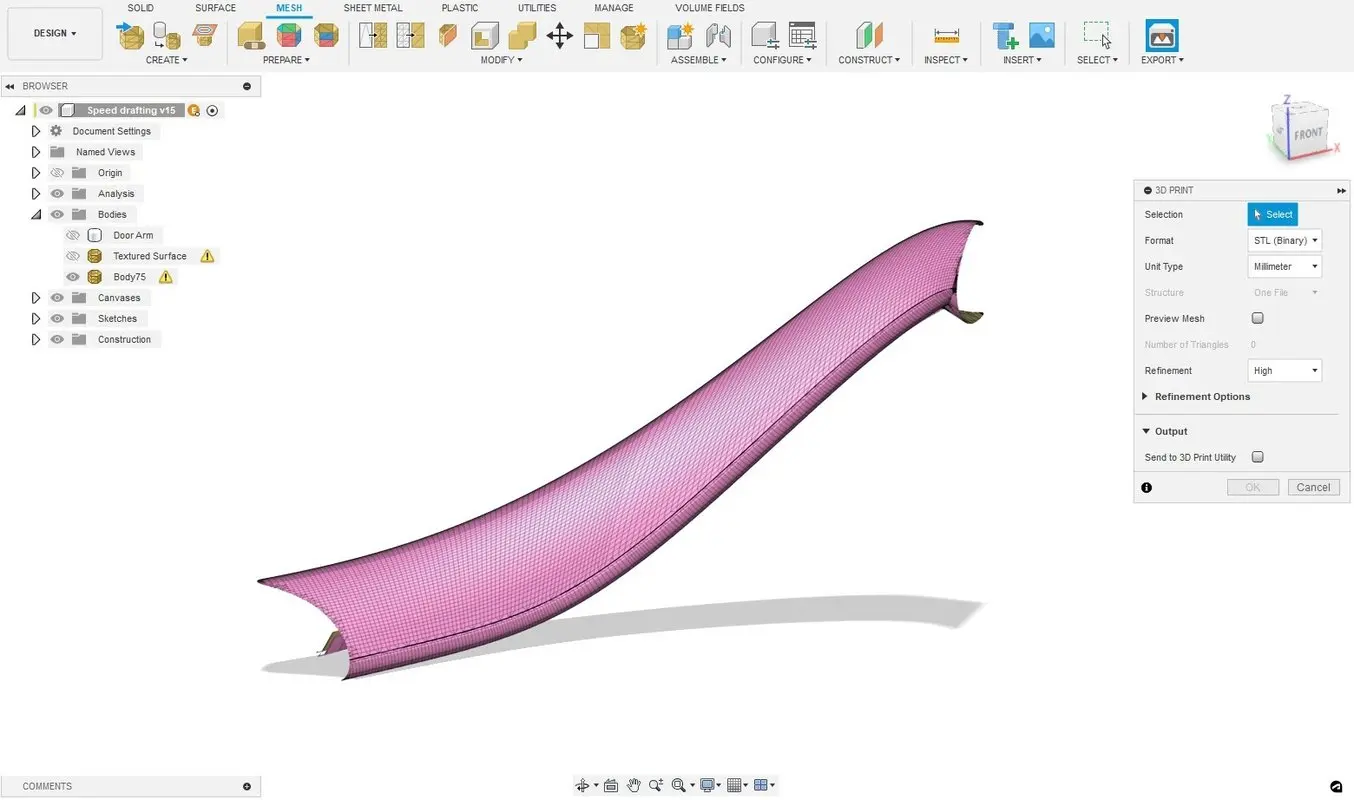
03 final geometry
Final Geometry to be exported; note the high mesh density.

2. Bring the Mesh Into the Formlabs Texturing Engine

2.1 Navigate to the Formlabs Texturing Engine. Login to your Dashboard account or register for a free account to ensure you can download the resulting file.

2.2 Import your .stl file.

2.3 Apply a displacement map to the model. This is selected from one of the greyscale images by default, but these can also be uploaded in an image file. In this example, we are using a leather displacement map from Ambient CG, which has a broad selection of texturing assets that can be used for free.

2.4 Adjust the parameters of the displacement map by moving the sliders in the toolbar at the left-hand side of the Texture Engine.

i. Scale adjusts the size of the model relative to the displacement model, or the texture’s frequency. A smaller scale will generate larger, coarser textures, and a larger scale for finer, more repetitive texture.

ii. Amplitude is weighting applied to the greyscale texture map. For more pronounced textures, increase this value.

iii. Sharpness controls how the texture maps around curves. This is a nuanced slider and values from 15-30 are recommended for most applications.

iv. Offset controls whether the displacement is embossed or debossed from the surface. When set to one, the texture will be fully embossed. If set to zero, it will be fully debossed. The offset is 0.5 in this example, so the texture will be both above and below the original surface.

v. Max Triangles controls the output detail by setting a triangle limit for the export. The best result will be achieved with this slider set to the maximum value.
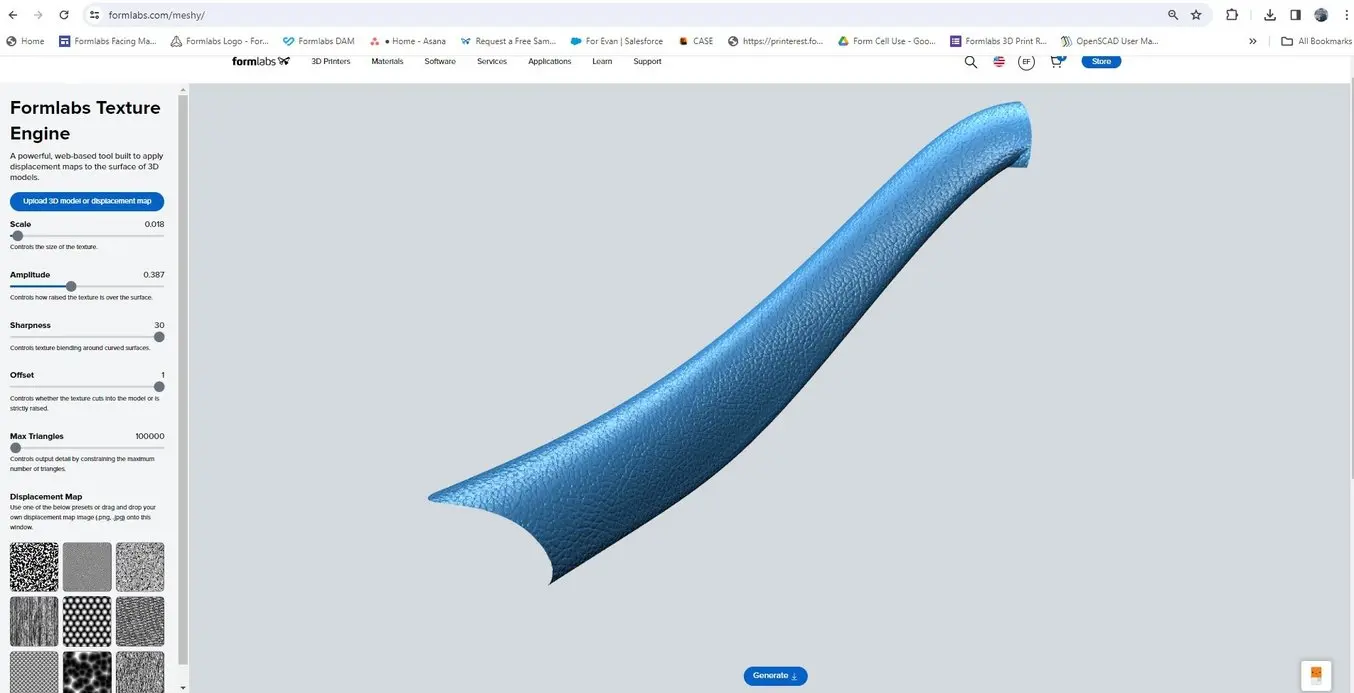
Formlabs Texture Engine
Applying the displacement map in the Formlabs Texture Engine (beta version).

3. Combining the Textured Surface and Exporting

3.1 Hit “generate” to output the final textured part. This new file will have the same coordinates as the original CAD/Mesh file. Ensure you are logged into your Dashboard account or create an account to download your file. Simply import this file into the original CAD tool to see how the texture looks.

3.2 To directly print the part, right-click the top-level component and select “Save as mesh.” This will convert the remaining CAD geometry into a mesh along with the textured mesh surface. This operation will create a non-manifold mesh as the textured surface has not been stitched to the original part. Most slicers, like PreForm, can easily address and fix these errors, but they can also be directly addressed in Fusion or with mesh repair tools if desired.
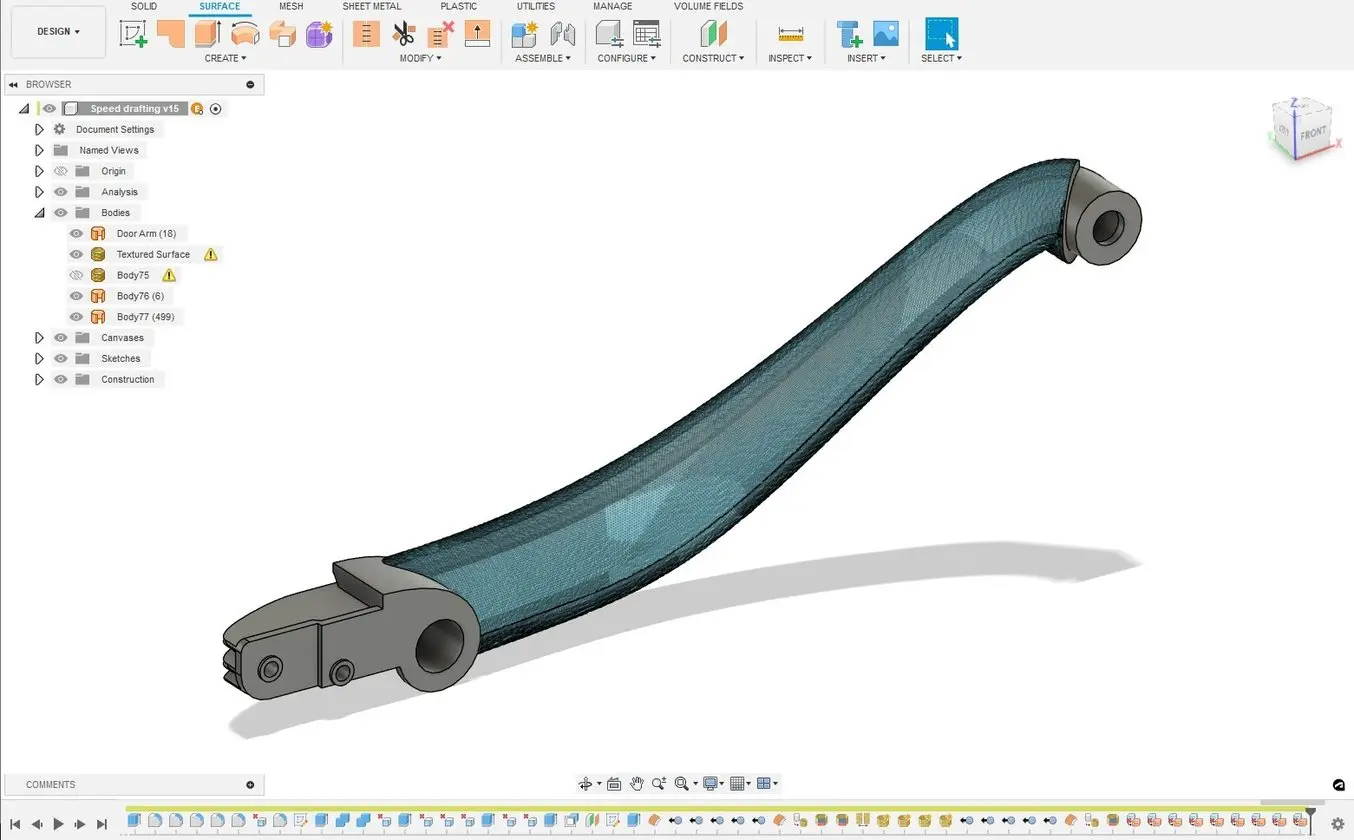
05 Textured mesh imported back into CAD
Textured mesh imported back into CAD.

4. Orient and Prepare Part for Printing

4.1 Bring the part into PreForm print preparation software.

4.2 Orient the part to minimize supports that directly touch the texture.
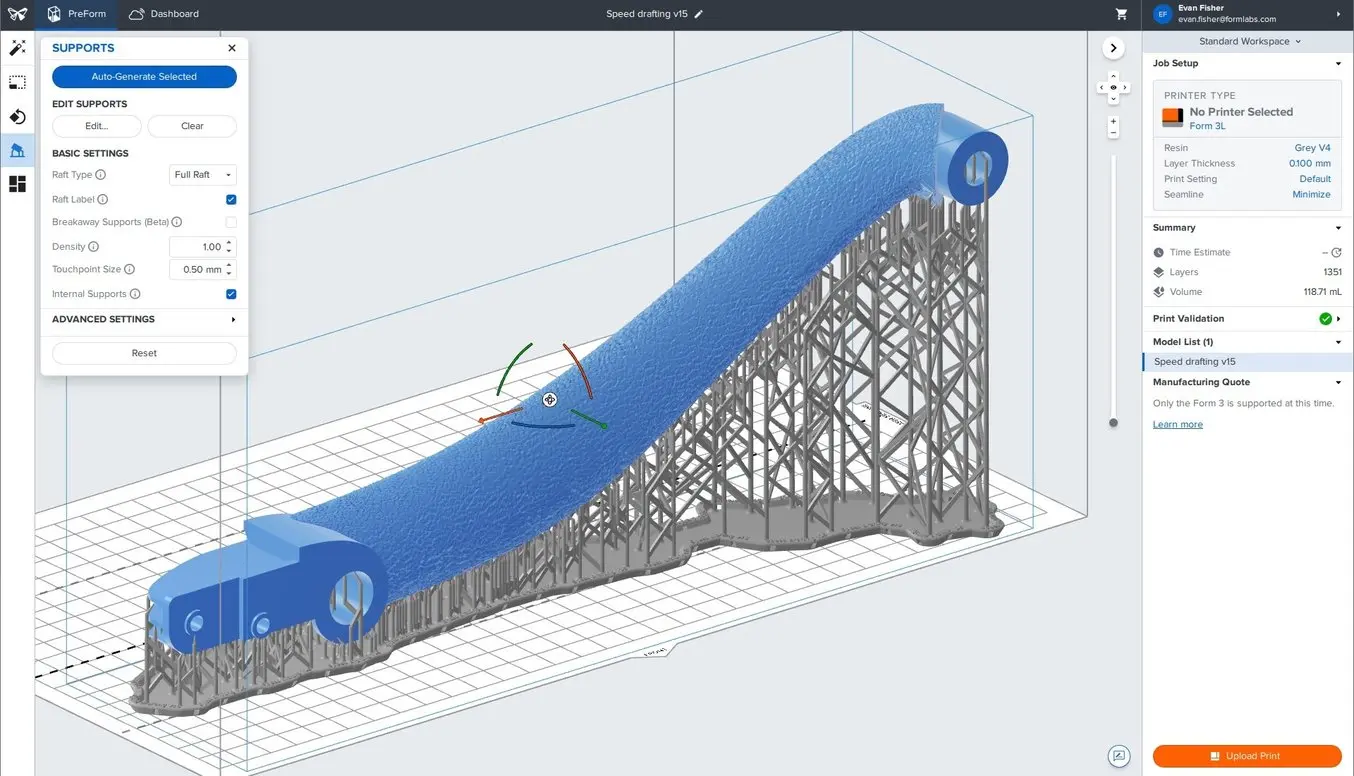
06 Orienting the textured part in PreForm
Orienting the textured part in PreForm and adding supports (for SLA printing).

4.3 Avoid placing the textured surface at a shallow angle (<5 degrees) to the build platform to avoid any stair-stepping artifacts on the textured surface.

4.4 Prepare the printer.

Tricks for 3D Printing Textured Parts

Achieving the perfect look and feel on a part requires a bit of experimentation, but the rapid response of the Texturing Engine makes it easy to iterate. Adjust the sliders to view effects and zoom in or out for a cohesive look at the part’s texture.

Different 3D printing processes have different requirements and capabilities for reproducing textured designs.
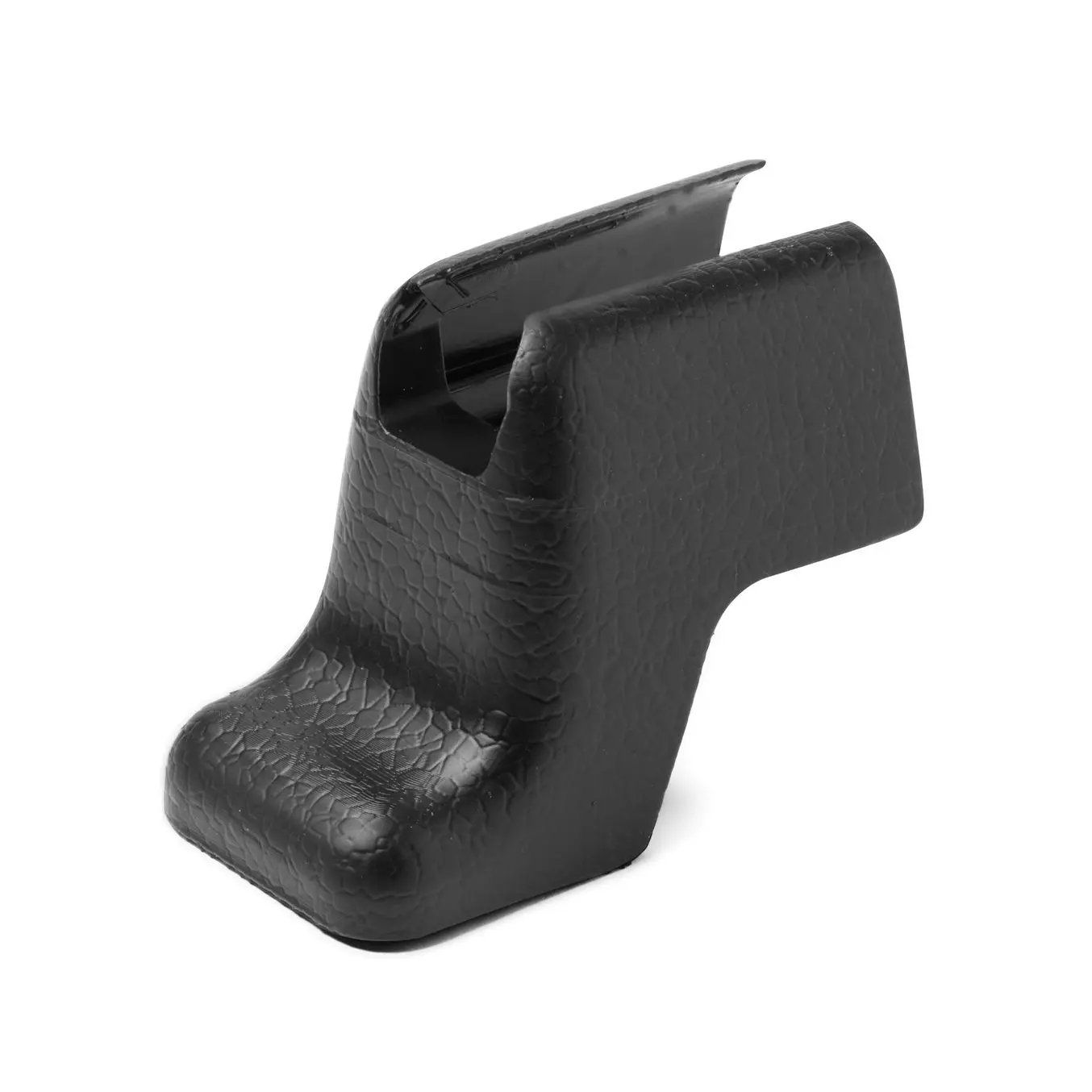
SLA 3d printingStereolithography (SLA) 3D printing can replicate intricate and subdued textures, making it an optimal method for printing parts with a wide range of textures and patterns.
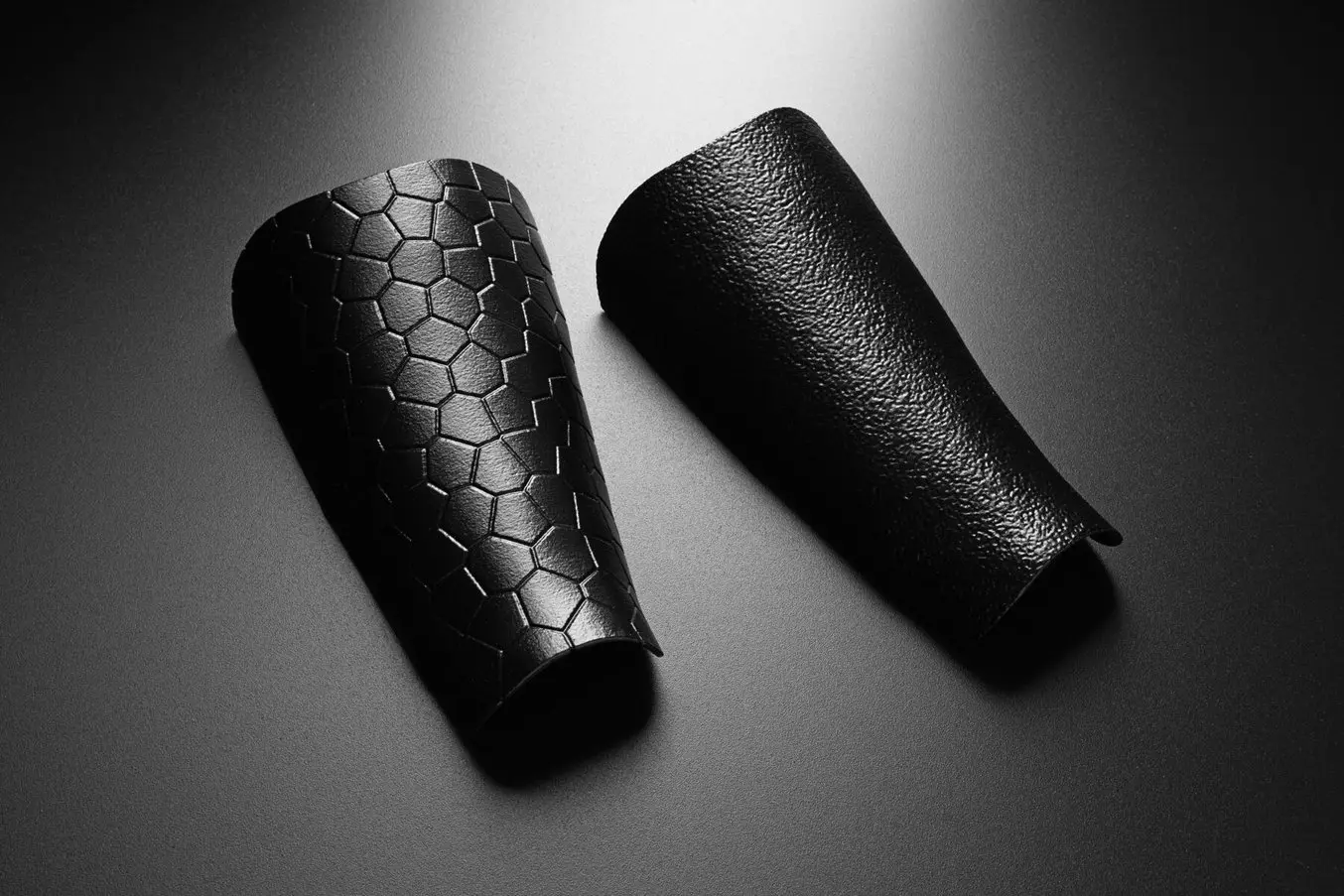
SLS 3d printingSelective laser sintering (SLS) 3D printing requires coarser, more exaggerated textures due to the slightly rougher surface finish, so adjustments should be made with this in mind.
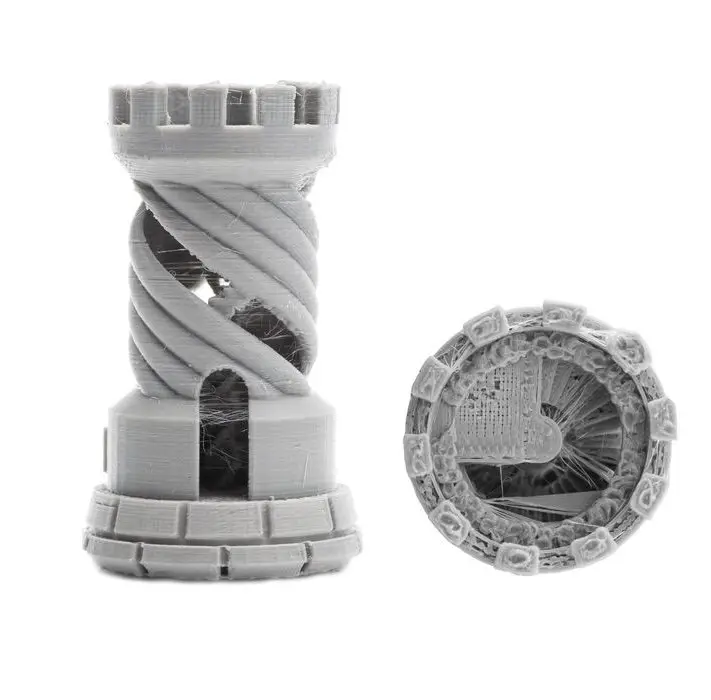
FDM 3d printingFused deposition molding (FDM) 3D printing can only resolve the most extreme textures on parts as layer lines are generally clearly visible on the surface, hiding or distorting the actual texture design.

Press ‘Print’

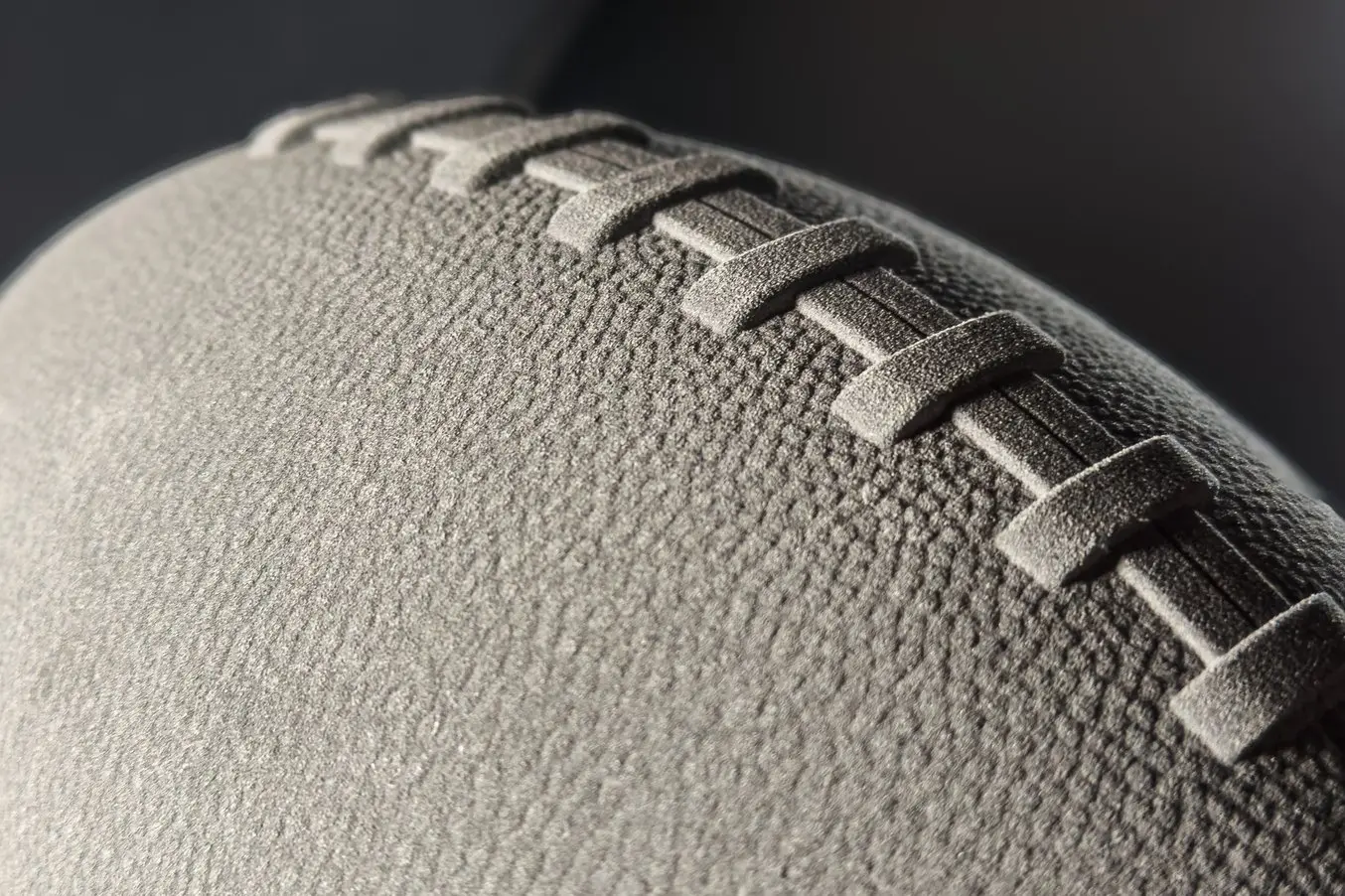
textured football
This textured football was printed with the Fuse 1+ 30W SLS 3D printer.

With the Formlabs Texture Engine, it’s possible to quickly apply surface textures and patterns to 3D models. Iterate quickly with this free, lightweight, web-based app and see how easy it is to add texture to 3D models.

Subscribe to AM Chronicle Newsletter to stay connected:  https://bit.ly/3fBZ1mP 

Follow us on LinkedIn: https://bit.ly/3IjhrFq 

Visit for more interesting content on additive manufacturing: https://amchronicle.com

Original Source

3d printing Formlabs Formlabs Texture Engine SLA
AM Chronicle Editorial Team

The AM Chronicle Editorial Team is a collective of passionate individuals committed to delivering insightful, accurate and engaging stories to additive manufacturing audiences worldwide.

NAMIC GLOBAL AM SUMMIT 2025
LATEST FROM AM
Bahrain’s First Advanced Additive Manufacturing Hub Launched Middle East

Bahrain Launches First Advanced Additive Manufacturing Hub in Partnership with Roboze

December 12, 20252 Mins Read
Airbus Now 3D Printing Over 25,000 Flight-Ready Plastic Parts Annually News

Airbus Now 3D Printing Over 25,000 Flight-Ready Plastic Parts Annually

December 12, 20252 Mins Read
Ms. Larissa Smith, Director, Advanced Manufacturing, DRPM, Maritime Industrial Base Program, U.S. Navy, and Mr. Ken Jeanos, VP, Materials and Supply Chain, General Dynamics Electric Boat, are joined by Lincoln Electric leadership and its Additive Solutions team to commemorate the ribbon cutting that marks the investment of four SculptPrint™ 1500 additive manufacturing cells to support the production of critical submarine components. Uncategorized

U.S. Navy’s Maritime Industrial Base Program, General Dynamics Electric Boat, and Lincoln Electric Advance Additive Manufacturing to Strengthen Submarine Production

October 3, 20252 Mins Read

CONNECT WITH US

  • 126 A, Dhuruwadi, A. V. Nagvekar Marg, Prabhadevi, Mumbai 400025
  • [email protected]
  • +91 022 24306319
Facebook Instagram YouTube LinkedIn

Newsletter

Subscribe to the AM Chronicle mailer to receive latest tech updates and insights from global industry experts.

SUBSCRIBE NOW

Quick Links

  • News
  • Insights
  • Case Studies
  • AM Training
  • AM Infocast
  • AM Magazine
  • Events

Media

  • Advertise with us
  • Sponsored Articles
  • Media Kit

Events

CNT Expositions & Services
© 2025 CNT Expositions & Services LLP.
  • Privacy Policy
  • Cookie Policy

Type above and press Enter to search. Press Esc to cancel.


0 / 75